Modern personal electronics rely on display screens as the primary bridge between human intention and digital execution. Whether tapping through urgent business communications on a smartphone, editing high-resolution visual media on a laptop, or immersing yourself in a portable gaming experience, the visual interface defines the user experience. When that glass shatters or the underlying visual matrix suffers traumatic impact shock, device owners are immediately confronted with technical repair choices. One of the most fundamental distinctions in modern electronics servicing centers on understanding lcd vs oled technology and how each display architecture dictates the nature, complexity, and cost of screen restoration.
For more than two decades, Liquid Crystal Displays held uncontested dominance over laptops, computer monitors, and early generations of smartphones. However, the commercial maturation of Active Matrix Organic Light-Emitting Diodes has fundamentally reshaped the consumer hardware landscape. Today, flagship smartphones from Apple, Samsung, and Google feature sophisticated OLED matrices capable of self-emissive brilliance, while budget-friendly phones, educational tablets, and mainstream work laptops frequently utilize high-grade LCD panels. Despite their shared duty of rendering crisp text and vibrant images, these two screen technologies operate on completely opposing physical principles.
The internal engineering differences between liquid crystal arrays and organic light-emitting diodes directly influence how physical damage manifests, which diagnostic tools are required, and how technicians approach service. Seeking an lcd screen repair requires navigating multi-layered optical backlight diffusers, liquid crystal cell gaps, and separate inverter circuitry. Conversely, performing an oled screen repair involves managing microscopic organic semiconductor layers, flexible polyimide substrates, delicate chip-on-film interconnects, and strict cryptographic serialization protocols. Misunderstanding these differences frequently leads consumers to overpay for inappropriate replacement parts or inadvertently compromise their device's battery life and visual fidelity by installing cheap, retrofitted components.
Navigating the servicing market demands technical literacy. Whether you are dealing with hairline glass fractures, irregular dark ink blotches, laser-straight vertical colored lines, or a completely unresponsive touch digitizer, knowing which display technology powers your device is the foundational first step. This comprehensive guide examines the underlying physics of LCD and OLED screens, dissects their architectural layers, analyzes specific failure symptoms, details professional servicing procedures, compares real-world repair costs across major hardware categories, and provides practical advice to help you choose the best servicing strategy for your broken device.
Architectural Deep-Dive: How LCD Panels Function and How They Are Built
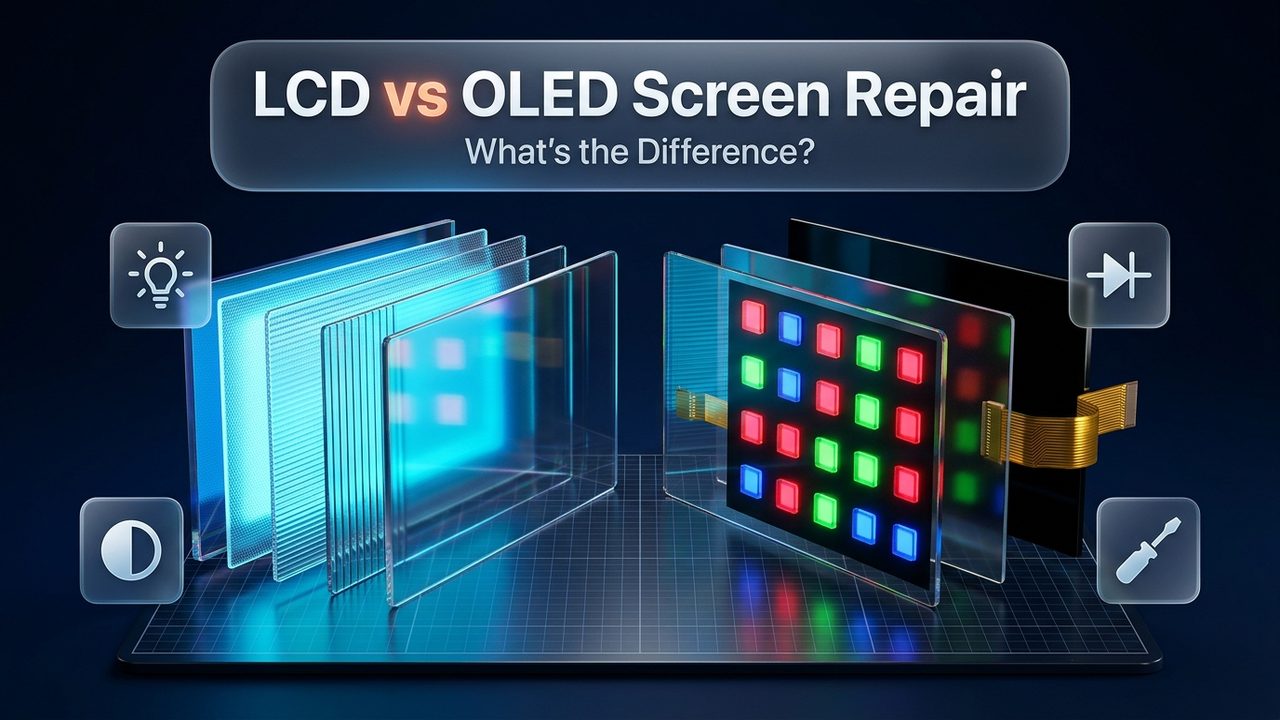
Grasping the intricacies of display service requires understanding the physical anatomy of the screen. Liquid Crystal Displays are fundamentally non-emissive optical transmissive systems. Unlike a flame, an incandescent filament, or an organic diode, liquid crystal molecules do not produce any light of their own. Instead, they act as microscopic electronic shutters, twisting and aligning under electric current to modulate, filter, and block light produced by an independent illumination source positioned directly behind them.
An LCD panel is assembled as a multi-layered sandwich of optical filters, glass sheets, electrical conductor matrices, and illumination diffusers. Every component must remain in precise micro-millimeter alignment for the display to produce a clean, uniform image without clouding or color distortion.
1. The Backlight Unit (BLU)
The foundation of every LCD is its dedicated illumination source, known as the Backlight Unit. In modern smartphones, tablets, and slim laptops, this system consists of high-efficiency white surface-mount light-emitting diodes (SMD LEDs) arranged along the edge of the panel (edge-lit) or distributed evenly across the rear surface (direct-lit). This light passes through an intricate stack of optical distribution sheets:
- Reflector Sheet: A mirror-like bottom membrane that redirects stray downward photons back up toward the viewer.
- Light Guide Plate (LGP): A precision-etched acrylic or polymethyl methacrylate (PMMA) sheet engineered with microscopic laser-etched dots that evenly spread point-source LED light across the entire surface area of the screen.
- Diffuser Films: Semi-translucent micro-textured sheets that soften sharp LED focal points, eliminating bright hotspots and creating an evenly distributed, uniform white field.
- Prism Sheets (Brightness Enhancement Films): Micro-replicated optical prisms that refract light rays emerging at wide angles and focus them directly perpendicular to the screen, maximizing perceived brightness toward the user's eyes while conserving battery power.
2. The Bottom Polarizing Filter
Light emerging from the backlight unit vibrates randomly in all perpendicular directions. Before this light can be controlled by liquid crystals, it must be linearly polarized. The bottom polarizing film allows only light waves vibrating in a single optical orientation (such as horizontally) to pass through, absorbing all other light waves.
3. The Thin-Film Transistor (TFT) Glass Substrate
Positioned above the bottom polarizer is a rigid glass substrate carrying millions of microscopic electrical circuits. Each sub-pixel on the display is controlled by its own dedicated thin-film transistor fabricated from hydrogenated amorphous silicon (a-Si) or indium gallium zinc oxide (IGZO). These transistors act as microscopic electronic valves, charging transparent indium tin oxide (ITO) electrodes that generate localized electrical fields across the liquid crystal layer.
4. The Liquid Crystal Fluid Layer
Sandwiched between two alignment layers is a nematic liquid crystal fluid measuring only a few micrometers in thickness. Liquid crystals exist in a state of matter between solid crystal and liquid fluid. In popular In-Plane Switching (IPS) panels, applying electrical voltage across the horizontal electrodes causes the rod-shaped liquid crystal molecules to rotate parallel to the glass substrate. This controlled rotation precisely twists the polarization angle of the incoming light waves, dictating exactly how much light can pass through to the next layer.
5. The Color Filter Glass and Top Polarizer
Once light passes through the twisted liquid crystal matrix, it encounters the color filter substrate. This layer features microscopic red, green, and blue resin filters organized into three distinct sub-pixels for every individual screen pixel. By varying the electrical voltage across the three sub-pixels, the panel blends red, green, and blue light intensities to reproduce millions of discrete colors. Finally, the light passes through a top polarizing filter oriented at a 90-degree angle to the bottom polarizer. If the liquid crystals have twisted the light's polarization angle by 90 degrees, the light emerges freely to create a bright pixel; if the crystals leave the light unrotated, the top polarizer blocks the light completely, resulting in a dark pixel.
6. Integrated Touch Digitizer and Cover Glass
On modern consumer devices, a capacitive touch digitizer grid is integrated directly onto the color filter glass (In-Cell or On-Cell touch technology) or bonded immediately above it using Optically Clear Adhesive. The entire optical module is capped by chemically tempered cover glass, such as Corning Gorilla Glass, providing scratch resistance and structural rigidity.
| LCD Layer Component | Primary Physical Function | Servicing Vulnerability | Repair Feasibility |
|---|---|---|---|
| LED Backlight Strip & Diffuser | Generates and uniformly disperses raw white illumination | Liquid staining, uneven cloudy spots, blown LED diodes | Modular swap or separate backlight replacement |
| Dual Linear Polarizers (Top & Bottom) | Aligns light waves at 90-degree relative polarization angles | Deep scratches, delamination, heat burn, silvering lines | Replaced during laboratory refurbishing |
| TFT Active Matrix Glass Substrate | Houses microscopic transistors addressing each sub-pixel | Brittle glass fracturing, severed bus lines, vertical lines | Irreparable; requires full assembly replacement |
| Liquid Crystal Fluid Matrix | Twists polarization angle under varying electrical voltage | Cell breach, fluid leakage, localized pooling and bruising | Irreparable; requires full screen replacement |
| Exterior Tempered Cover Glass | Physical impact protection and smooth touch surface | Shattering, spiderweb fractures, edge chipping | Glass refurbishment or complete modular swap |
Architectural Deep-Dive: How OLED Panels Function and How They Are Built
Organic Light-Emitting Diode technology eliminates the concept of backlighting entirely. OLED screens are self-emissive systems: every microscopic pixel produces its own discrete light and color independently when stimulated by electric current. When an OLED pixel is instructed to render black, it shuts off completely, consuming zero electricity and generating an infinite static contrast ratio with absolute black levels.
Because OLED screens do not require thick light guide plates, diffuser sheets, or rigid glass backplanes, they are substantially thinner, lighter, and more mechanically versatile than comparable LCD panels. Modern mobile devices predominantly utilize Active Matrix OLED (AMOLED) or Super Retina XDR displays built atop flexible polymer films rather than traditional glass sheets.
1. Flexible Polyimide (PI) Substrate
Modern mobile OLED panels begin on an ultra-thin, heat-resistant plastic film made of polyimide. This flexible base allows manufacturers to curve the bottom edge of the display backward underneath itself inside the device chassis. Folding this bottom edge houses the Chip-on-Film (COF) display driver integrated circuit inside the frame, allowing modern smartphones to achieve virtually borderless bottom bezels. Furthermore, flexible polyimide substrates offer superior shock absorption compared to brittle, rigid glass LCD backplanes.
2. The Low-Temperature Polycrystalline Silicon / Oxide (LTPO) Backplane
Mounted directly above the polyimide base is the Thin-Film Transistor driving layer. In high-end flagship devices, Apple and Samsung deploy Low-Temperature Polycrystalline Oxide backplanes. LTPO technology combines fast-switching LTPS transistors with energy-efficient indium gallium zinc oxide transistors. This architecture allows the screen to dynamically scale its refresh rate from a blisteringly smooth 120Hz down to a static 1Hz during idle reading, conserving substantial battery life while maintaining responsive touch sampling.
3. The Organic Emissive Stack
The core visual engine consists of microscopic organic hydrocarbon molecules deposited through thermal evaporation in ultra-high vacuum cleanroom chambers. Each sub-pixel contains several microscopic functional layers:
- Reflective Anode: A conductive bottom layer that injects positive electrical holes into the organic material while reflecting emerging photons outward toward the viewer.
- Hole Injection & Transport Layers (HIL & HTL): Semiconductor layers that accelerate and stabilize the flow of positive electrical charges.
- Emissive Layer (EML): The critical zone where positive holes and negative electrons collide to form energetic excitons. As these excitons decay to their ground state, they release energy in the form of visible photons. Specialized organic dopants dictate whether the emission produces pure red, green, or blue light.
- Electron Transport & Injection Layers (ETL & EIL): Specialized materials that facilitate the uniform transit of electrons from the semi-transparent top cathode.
4. Thin-Film Encapsulation (TFE)
Organic light-emitting compounds are sensitive to atmospheric moisture and oxygen. Exposure to even microscopic levels of ambient humidity triggers rapid oxidation that destroys the organic molecules instantly. To prevent this decay, flexible OLED displays are sealed beneath an advanced Thin-Film Encapsulation barrier consisting of alternating organic polymer layers and inorganic ceramic barrier films (such as silicon nitride). This hermetic barrier is only micrometers thick yet provides impermeable defense against moisture penetration.
5. Circular Polarizer and Touch Digitizer (Y-OCTA)
Because the metallic anode layers inside the OLED are highly reflective, ambient sunlight entering the display would bounce back and wash out screen visibility. Modern OLEDs incorporate an ultra-thin circular polarizer film that arrests reflected ambient light waves while allowing self-generated pixel light to escape unimpeded. Above the polarizer, Samsung's Youm On-Cell Touch AMOLED (Y-OCTA) or Apple's integrated touch sensors deposit capacitive indium tin oxide electrode traces directly onto the encapsulation layer, eliminating separate adhesive bonding sheets.
| Architectural Dimension | Liquid Crystal Display (LCD) | Organic Light-Emitting Diode (OLED) |
|---|---|---|
| Illumination Mechanism | Transmissive: External white LED backlight unit required | Self-emissive: Every individual pixel generates its own light |
| Black Level & Contrast Ratio | Limited (1,000:1 to 1,500:1); light bleeds through closed shutters | Infinite (True Black); inactive pixels emit exactly zero nits |
| Panel Thickness & Flexibility | Thicker (1.5mm–2.5mm); rigid glass plates prevent curved borders | Ultra-thin (0.5mm–0.9mm); flexible polyimide base allows folds |
| Pixel Response Times | Moderate (1ms–5ms); physical liquid crystals must physically twist | Near-instantaneous (0.1ms); instantaneous electronic switching |
| Energy Efficiency Profile | Constant power draw regardless of displayed image color | Dynamic; dark themes consume minimal battery, white draws more |
| Environmental Sensitivity | Immune to oxygen degradation; vulnerable to moisture in diffusers | Highly vulnerable to oxygen/moisture oxidation if encapsulated seal breaks |
Failure Modes & Symptom Recognition: How LCD and OLED Panels Break
Because liquid crystal displays and organic light-emitting displays rely on distinct physical mechanisms to produce imagery, they exhibit completely different behavioral symptoms when damaged. Understanding these failure modes allows technicians and device owners to quickly pinpoint which internal layer has failed and determine whether the issue is cosmetic or structural.
Typical LCD Failure Symptoms
When an LCD device suffers a heavy drop, severe torsional twisting, or liquid intrusion, the failure typically involves the backlight unit, the rigid TFT glass substrate, or the delicate liquid crystal cell seal:
- White Light Bleed Along Perimeter Edges: Impact force often dislodges or bends the plastic frame retaining the backlight stack. When this occurs, unfiltered white light from the edge-lit LED strip escapes past the display masking tape, projecting visible bright white or yellowish flares along the screen borders.
- Uneven Clouding and White Pressure Spots: Localized point pressure—such as carrying keys in a tight pocket or pressing down hard on a laptop lid—can deform the microscopic prism sheets inside the backlight. These deformed micro-prisms redirect concentrated pools of light toward the viewer, appearing as permanent white cloudy spots or "bruises" that remain visible against white backgrounds.
- Geometric Crystalline Ink Pooling: If an impact cracks the inner glass substrate without shattering the outer cover glass, the liquid crystal fluid leaks from its microscopic cell gaps. This manifests as jagged, geometric black or dark violet patches resembling dried ink stains trapped beneath the glass. Unlike OLED ink bleeds, LCD fluid stains are bounded by the internal spacer walls and usually do not expand rapidly across the entire screen.
- Complete Backlight Failure (Flashlight Phenomenon): Dropping an LCD device or exposing it to water can burn out the high-voltage backlight driver fuse, coil, or LED ribbon circuit on the motherboard while leaving the display matrix intact. The screen appears completely pitch black, but shining a high-intensity flashlight at an angle reveals faint app icons and active text, confirming that the logic board is working while the backlight illumination has died.
Typical OLED Failure Symptoms
Organic displays feature no backlight, no liquid crystal fluid, and no diffuser sheets. Consequently, physical impacts produce distinct failure modes governed by semiconductor physics and chemical oxidation:
- The Expanding Black Ink Blot (Oxidation Spread): The most recognizable OLED failure symptom is the appearance of inky, rounded black spots that swallow portions of the display. When a drop breaches the thin-film encapsulation layer, ambient atmospheric moisture and oxygen penetrate the hermetic seal. The organic emissive compounds oxidize and decompose upon contact with air, causing adjacent pixels to die in an expanding, blob-like pattern that grows over hours and days until the screen goes completely dark.
- Solid Vertical Green, Pink, or White Lines: Thin, laser-straight vertical colored lines running from top to bottom are a signature OLED failure. This issue occurs when physical shock or localized frame pressure fractures the micro-soldered Chip-on-Film ribbon traces or damages the anisotropic conductive film (ACF) bonding along the bottom driver bus. A single severed microscopic data trace causes an entire column of sub-pixels to remain energized at full saturation or shut off entirely.
- Total Black Screen with Active Haptics: Dropping an OLED smartphone frequently cuts power to the fragile polyimide power rail. The device remains fully powered on—ringing during incoming calls, vibrating during notifications, and connecting to Bluetooth accessories—while the display screen remains utterly lifeless with zero light output.
- Persistent Burn-In and Image Retention: Because organic sub-pixels degrade gradually as they emit light over thousands of hours, leaving high-contrast static elements (such as navigation icons, status bars, or keyboard outlines) on screen at high brightness can cause differential aging. The heavily used sub-pixels lose their peak luminous efficiency faster than surrounding pixels, leaving permanent ghostly silhouettes visible against solid color backgrounds.
- Aggressive Low-Brightness Flickering: Failing OLED driving circuits often lose the ability to regulate pulse-width modulation (PWM) dimming smoothly, resulting in rapid strobe-like screen flicker, green tinting, or uneven gamma brightness when viewing the display in dark environments.
| Visible Diagnostic Symptom | Underlying Defect Mechanism | Affected Display Type | Service Remedy |
|---|---|---|---|
| Faint image visible only under flashlight beam | Blown backlight fuse, failed LED rail, severed ribbon | LCD Only | Backlight replacement or motherboard fuse microsoldering |
| Laser-straight vertical green, pink, or purple line | Severed COF/COP bus trace or tab-bonding fracture | OLED (predominantly) | Laser trace re-welding or complete modular replacement |
| Inky black rounded blobs expanding across display | Encapsulation breach causing organic oxidation | OLED Only | Full modular screen replacement strictly required |
| Bright white or yellow cloudy spots on light background | Deformed optical diffuser/prism sheets inside backlight | LCD Only | Backlight diffuser layer swap or modular replacement |
| Permanent ghost outlines of static apps / keyboard | Differential organic emitter lumen decay (burn-in) | OLED Only | Full modular screen replacement |
| Spiderweb surface cracks, display & touch 100% normal | Fractured outer tempered glass / Ceramic Shield | Both LCD and OLED | Glass refurbishment (repair) or modular replacement |
The Repair Process: How Technicians Fix LCD Screens
Executing an lcd screen repair involves specific mechanical considerations dictated by the physical rigidity and multi-layered nature of liquid crystal displays. Because LCD panels rely on separate backlight assemblies and thicker structural frame bezels, servicing procedures differ substantially from those applied to flexible OLED hardware.
1. Modular Assembly Replacement for LCDs
In high-volume repair facilities, modular replacement represents the primary method for servicing damaged LCD screens. The technician unfastens the device housing, disconnects the battery terminal, and decouples the display flex ribbon cables connecting the LCD data lines and backlight power rails to the motherboard. A brand-new integrated assembly—consisting of factory-bonded cover glass, touch digitizer, IPS liquid crystal cell, and LED backlight unit—is seated directly into the chassis.
Because LCDs are mechanically rigid, they are less prone to edge-tearing during removal compared to ultra-thin OLEDs. However, technicians must exercise extreme care when cleaning the metal housing frame. If a tiny speck of debris, glass dust, or a misaligned screw remains lodged inside the frame, tightening the display screws will press the rigid back of the LCD directly against that obstruction, creating permanent white pressure spots or cracking the brittle glass substrate from behind.
2. Separate Backlight Unit Replacement
A distinctive servicing advantage of LCD technology is the modular independence of the backlight unit. On devices such as Apple MacBooks, iPads, and select smartphones, if the screen suffered liquid intrusion that stained the diffuser sheets with water spots, or if specific LED diodes burned out while the liquid crystal panel remains pristine, skilled technicians can replace only the backlight unit.
This procedure requires peeling away the rear reflective tape in a dust-free cleanroom environment, unseating the light guide plate, discarding the contaminated diffuser sheets, and soldering a fresh LED backlight ribbon directly to the display power bus. Performing a backlight replacement rescues an expensive factory-original LCD panel at a fraction of the cost of purchasing an entire display assembly.
3. Glass Refurbishment on LCDs
When the outer protective glass is shattered but the underlying LCD panel and touch digitizer function flawlessly, glass-only refurbishment is technically feasible. The technician heats the assembly to approximately 80°C to soften the Optically Clear Adhesive, threads a fine 0.04mm molybdenum wire between the glass and the top polarizing filter, and slices through the adhesive layer.
However, glass refurbishment on LCD panels carries distinct technical hurdles compared to OLEDs. Liquid solvents used to dissolve residual glue must never contact the edges of the LCD stack. If solvent seeps past the perimeter seal, it will wick into the porous backlight diffuser sheets, creating permanent translucent stains that ruin the display. Consequently, because wholesale replacement LCD assemblies for popular devices like the iPhone 11 or iPhone SE are relatively inexpensive, glass refurbishment on LCDs is rarely cost-effective unless servicing rare, high-value tablet or industrial panels.
The Repair Process: How Technicians Fix OLED Screens
Undertaking an oled screen repair demands a substantially higher tier of micro-engineering precision, cleanroom discipline, and specialized thermodynamic machinery. Because modern OLEDs utilize flexible polyimide substrates measuring fractions of a millimeter in thickness and are vulnerable to environmental oxidation, technicians must adhere to rigorous service protocols.
1. The Precision Modular OLED Assembly Swap
When an OLED display suffers internal pixel death, vertical line defects, or complete substrate blackout, a full modular replacement is required. During this procedure, the technician softens the device perimeter waterproof seal using controlled thermal plates maintained between 70°C and 75°C. Excessive heat must be avoided, as temperatures exceeding 85°C can degrade the organic compounds in undamaged sections of the screen or cause lithium-ion battery instability.
Opening the device requires delicate nylon shims and micro-calibrated suction fixtures. Because flexible OLED panels have zero structural rigidity of their own, inserting a metal pry tool too deeply or prying at an improper angle can instantly shear the microscopic Chip-on-Film flex traces along the bottom edge, permanently destroying the display. Once disconnected, the technician installs an authentic OEM or high-grade Soft OLED replacement unit, applying precision die-cut waterproof perimeter gaskets before clamping the chassis under calibrated pneumatic pressure.
2. Industrial Glass Refurbishment on OLED Panels
Because authentic OEM OLED assemblies for modern flagships—such as the iPhone 15 Pro Max, iPhone 16 Pro, or Samsung Galaxy S24 Ultra—carry high replacement costs, glass-only refurbishment delivers immense economic value. When the organic pixel matrix and touch digitizer are 100% undamaged beneath shattered exterior glass, specialized laboratories perform glass refurbishment using industrial machinery:
- Cryogenic Freezing Separation: The display module is placed inside a cryogenic chamber chilled with liquid nitrogen to -150°C to -180°C. At this extreme temperature, the synthetic polymers inside the OCA layer contract and lose their adhesive grip instantly. With minimal mechanical force, the fractured cover glass lifts cleanly away from the flexible OLED substrate without applying thermal stress or shear friction to the delicate organic layers.
- Heated Vacuum Micro-Wire Slicing: Alternatively, the panel is secured to a heated vacuum table while an ultra-fine 0.028mm tungsten alloy wire slices through the softened adhesive layer with microscopic clearance above the circular polarizing film.
- Cleanroom OCA Lamination & Autoclave Curing: The cleaned OLED panel enters a Class 100 laminar flow cleanroom workbench where a fresh sheet of optically clear adhesive and a factory-spec tempered glass panel are aligned inside custom CNC-milled molds. The assembly is laminated inside a vacuum chamber to eliminate air entrapment, followed by fifteen minutes inside a heated pressure autoclave operating at 6 to 8 bars of atmospheric pressure to dissolve residual microscopic bubbles.
3. Advanced Laser Repair for OLED Line Defects
One of the most remarkable breakthroughs in modern electronics servicing is the deployment of OLED laser repair machines. When an OLED panel exhibits an isolated vertical green, pink, or white line caused by an internal short circuit or severed micro-trace on the driving bus, technicians no longer need to discard the screen. Operating under high-magnification optical microscopes, a pulsed laser beam penetrates the outer glass without damaging it, focusing its energy directly onto the microscopic conductive ITO traces below. The laser instantly burns away internal short circuits or micro-welds severed trace connections, restoring the defective pixel column to flawless operational performance.
The Market for Replacement Parts: OEM vs. Aftermarket Tiers
When booking a repair service for an electronic device, consumers frequently encounter significant variations in quoted prices across different repair facilities. These price discrepancies stem almost entirely from the quality tier of the replacement screen assembly installed by the technician. Navigating these options requires understanding how replacement display tiers differ in manufacturing origin, visual fidelity, and structural longevity.
The Problem with Retrofitted "Incell LCD" Replacements on OLED Devices
In an effort to offer rock-bottom pricing on repairs for OLED-equipped smartphones (such as the iPhone 12, 13, 14, or 15 series), some budget repair shops install aftermarket Incell LCD replacement screens. While an Incell LCD will physically fit into the chassis and power on, retrofitting an LCD onto a device engineered specifically for an OLED display introduces serious technical compromises:
- Severe Battery Drain: An OLED smartphone logic board manages power dynamically, anticipating that dark UI modes will draw minimal electrical current. Retrofitting an LCD forces the phone's battery to continuously power a high-intensity white LED backlight unit across 100% of the screen area at all times, drastically reducing battery life by 20% to 35%.
- Excessive Heat Generation: Continuous backlight operation inside a slim, sealed smartphone enclosure generates significant internal heat. This elevated thermal baseline accelerates battery degradation and can cause processor thermal throttling during moderate use.
- Physical Frame Lip Protrusion: Because an LCD requires backlight diffusers, light guide plates, and reflector sheets, the assembly is noticeably thicker than a razor-thin OLED panel. Installing an LCD creates an unsightly lip where the glass protrudes above the protective metal frame edge, leaving the screen highly vulnerable to corner cracking upon the slightest drop.
- Degraded Visual Quality: Retrofitted LCDs suffer from washed-out colors, narrow viewing angles, and a complete absence of true HDR peak brightness, reducing deep blacks to murky grayish-blue hues.
The Hierarchy of Screen Replacement Quality Tiers
To ensure long-term satisfaction and device reliability, professional service centers provide transparent choices across verified hardware tiers:
| Quality Tier | Manufacturing Technology | Visual Fidelity & Refresh Rate | Durability & Drop Resilience | Target Application |
|---|---|---|---|---|
| Original OEM / Service Pack | Authentic manufacturer component (Apple, Samsung, LG Display) | 100% factory color gamut, full peak HDR nits, native 120Hz ProMotion | Maximum; genuine Ceramic Shield or Gorilla Glass Victus | Flagship phones, premium laptops, professional creators |
| OEM Refurbished | Recycled original OLED/LCD matrix laminated with new exterior glass | 98%–100% original color accuracy, native dynamic refresh rates | High; high-grade tempered glass with oleophobic coating | Best balance of authentic performance and cost savings |
| Aftermarket Soft OLED | Flexible polyimide substrate matching original Apple/Samsung curves | 90%–95% color gamut match, excellent contrast, smooth touch sampling | High; flexible polyimide base resists impact shock effectively | Standard professional replacement for OLED flagships |
| Aftermarket Hard OLED | Rigid glass substrate base rather than flexible polyimide polymer | 85%–90% color match, slightly thicker bottom chin bezel | Moderate; rigid glass substrate is brittle under corner impacts | Budget-conscious repair for older OLED smartphones |
| Aftermarket Incell LCD | Backlit LCD panel retrofitted into an OLED chassis specification | 70%–80% color accuracy, washed-out blacks, no true HDR | Low; thicker stack protrudes above frame, easily cracked | Temporary trade-in preparation or emergency budget fix |
Cost Analysis: LCD Screen Repair vs. OLED Screen Repair Across Devices
The stark difference in raw manufacturing complexity between liquid crystal displays and organic light-emitting displays translates directly into servicing price tags. Producing an LCD panel involves stamping well-understood glass sheets, diffusers, and mass-market LED strips using high-yield, mature manufacturing lines that have operated globally for decades. In contrast, producing an OLED display requires multi-billion dollar semiconductor fabrication facilities utilizing precision thermal evaporation chambers under ultra-high vacuum, leading to significantly higher wholesale component costs.
Understanding realistic cost benchmarks across different device categories helps consumers make educated repair choices, avoiding both inflated authorized service fees and suspiciously low quotes that conceal low-grade aftermarket parts.
1. Smartphones: Entry-Level LCD vs. Flagship OLED
On legacy and budget smartphones utilizing LCD panels—such as the iPhone 11, iPhone XR, iPhone SE series, and Samsung Galaxy A-series—a complete screen replacement typically ranges between $70 and $115 at independent professional repair centers. For standard OLED flagships like the iPhone 12 through iPhone 15 or Samsung Galaxy S21 through S23, modular replacement with a premium Soft OLED assembly ranges from $130 to $220. Pro-tier flagships featuring 120Hz LTPO ProMotion OLED panels—such as the iPhone 15 Pro Max or Galaxy S24 Ultra—range from $240 to $380 for authentic OEM-specification units.
2. Tablets: Standard iPad LCD vs. iPad Pro OLED
Apple's tablet lineup provides a clear showcase of the cost divergence between display technologies. Standard iPads (such as the 9th and 10th generation) utilize modular LCD panels where the outer glass digitizer can often be replaced independently from the LCD panel beneath for approximately $80 to $120. In contrast, flagship iPad Pro models equipped with Tandem OLED technology require complete modular display swaps ranging from $350 to over $500 due to the extreme precision of their multi-layer emissive panels.
3. Laptops: Mainstream IPS LCD vs. High-End OLED Displays
Mainstream Windows laptops from Dell, HP, Lenovo, and Asus utilizing 1080p IPS LCD screens represent very economical servicing candidates. Sourcing and replacing a standard 15.6-inch IPS LCD panel typically costs between $120 and $190 including labor. Conversely, servicing a premium creator laptop featuring a 4K OLED panel or replacing a MacBook Pro Liquid Retina XDR display ranges from $300 to over $600, reflecting the high wholesale cost of factory-calibrated emissive panels.
4. Handheld Gaming Consoles: Nintendo Switch LCD vs. Nintendo Switch OLED
Nintendo's hybrid console illustrates this exact cost contrast. Servicing a cracked screen on a standard Nintendo Switch (which features a 6.2-inch 720p LCD) generally costs between $75 and $95. Repairing the 7.0-inch vibrant panel on a Nintendo Switch OLED model ranges between $115 and $145, directly reflecting the price premium of organic emissive hardware.
| Device Hardware Tier | Display Panel Technology | Average Part & Labor Cost | Average Turnaround Time | Primary Recommendation |
|---|---|---|---|---|
| iPhone 11 / XR / SE Series | Liquid Retina IPS LCD | $70 – $110 | 30 to 45 minutes | Full modular replacement |
| iPhone 12 / 13 / 14 / 15 | Super Retina XDR OLED | $130 – $220 | 30 to 45 minutes | Premium Soft OLED or OEM Refurb |
| iPhone 15 Pro / 16 Pro Max | 120Hz LTPO ProMotion OLED | $240 – $380 | 45 to 60 minutes | OEM Service Pack or Glass Refurb |
| Samsung Galaxy S22 / S23 / S24 | Dynamic AMOLED 2X | $170 – $290 | 45 to 60 minutes | OEM Service Pack with frame |
| Standard 15.6" Windows Laptop | 1080p FHD IPS LCD | $120 – $190 | Same-day / 24 hours | Direct panel replacement |
| Nintendo Switch (Standard vs OLED) | 6.2" LCD vs 7.0" OLED | $75–$95 (LCD) / $115–$145 (OLED) | 1 to 2 hours | Modular display swap |
When planning a display service, consider evaluating your device's overall operating health. Pairing your screen restoration with an iPhone battery replacement or inspecting a worn USB-C connection for charging port repair restores comprehensive hardware functionality during a single technical service visit.
Software Serialization, True Tone, and Calibration Constraints
Modern display servicing extends beyond the mechanical fastening of frames and seating of flex connectors. Over recent hardware generations, major manufacturers have introduced cryptographic hardware serialization that binds the display assembly directly to the device's central logic board.
Within both LCD and OLED assemblies, small integrated circuits house EEPROM chips storing unique serialized identifiers, factory color profiles, and touch sensitivity tables. When the device boots, the operating system's security architecture—such as Apple's Secure Enclave—performs an encrypted handshake across the communication bus to authenticate the attached panel.
The Consequences of Uncalibrated Screen Replacements
If a replacement display is mounted without transferring the original configuration parameters or completing official system calibration, users experience specific software restrictions:
- Loss of Ambient Color Balancing (True Tone): On Apple hardware, swapping a display without copying the original calibration data causes iOS to disable the True Tone toggle entirely. Because the operating system cannot read the calibrated color temperature profile of the replacement panel, it refuses to adjust color warmth dynamically under ambient room lighting.
- System Security Notifications: iOS displays an "Important Display Message" stating, "Unable to verify this iPhone has a genuine Apple display." While this notification does not restrict core touch or visual functionality, it remains pinned to the main Settings menu for four days before settling into the About section under Parts and Service History.
- Disrupted Dynamic Refresh Rate Timing: On flagship OLED panels equipped with 120Hz ProMotion or variable refresh rates, unverified third-party driving ICs can experience stuttering refresh transitions, locking the panel at lower refresh rates or causing micro-stutter during rapid gaming inputs.
How Professional Technicians Preserve Display Calibration
Professional repair centers utilize dedicated external hardware programmers (such as QianLi or JC programming systems) to read the serialized flash code from the damaged original display and write it directly into the EEPROM of the replacement assembly before installation. This digital transplant preserves True Tone and ambient light auto-brightness seamlessly.
Furthermore, certified technicians participating in authorized service programs utilize official cloud-based System Configuration suites. Once the physical hardware is installed, the device connects to manufacturer servers, registering the new serialized components securely, eliminating warning banners, and ensuring all biometric sensors—including Face ID and under-display optical fingerprint scanners—operate with factory precision.
Preventive Care and Display Longevity: Protecting LCDs and OLEDs Post-Service
Investing in professional screen repair or replacement deserves to be safeguarded through disciplined everyday care habits. Because LCD and OLED panels have different physical vulnerabilities, adopting tailored protection strategies maximizes the lifespan of your restored display:
1. High-Density 9H Tempered Glass and Raised-Bezel Cases
Applying a high-grade 9H tempered glass screen protector is essential for both display types. Tempered glass serves as a sacrificial impact barrier, absorbing kinetic drop shock and dispersing localized shear energy before it can fracture your phone's cover glass. Pair your protector with a shock-absorbing case featuring raised front protective lips measuring at least 1.0mm to 1.5mm above the display plane. This raised edge prevents direct glass contact with concrete or rough terrain when your phone is placed face-down or dropped on flat surfaces.
2. Mitigating OLED Burn-In and Image Retention
To maximize the operational lifespan of organic emissive displays, follow several simple software settings:
- Enable Short Auto-Lock Intervals: Set your device screen timeout to 30 seconds or one minute to prevent static app interfaces from remaining illuminated when the phone is unattended.
- Utilize Dark Mode System-Wide: Enabling dark mode significantly reduces overall OLED power consumption and allows individual organic pixels to rest completely while displaying black backgrounds.
- Avoid Maximum Brightness in Static Applications: Running navigation apps, rideshare driver interfaces, or social media apps at 100% manual brightness for extended hours accelerates organic sub-pixel aging. Keep automatic brightness enabled to let the device regulate luminous intensity naturally.
3. Protecting LCDs from Moisture and Pressure Traps
Unlike OLEDs, LCD panels are vulnerable to moisture capillary action. Never use your device in steam-filled bathrooms or expose it to humid environments after a repair, as moisture can easily wick into the porous backlight diffuser sheets, creating permanent translucent stains. Additionally, avoid placing heavy objects on closed laptop lids or carrying tablets in packed backpacks without rigid protective sleeves, preventing permanent white pressure spots on the liquid crystal matrix.
Professional Screen Repair Services at DC Phone Repair
Whether you require an efficient lcd screen repair for a school tablet or work laptop, or a high-precision oled screen repair for your flagship smartphone, navigating the repair process should never be stressful. At DC Phone Repair, our certified technicians possess extensive micro-engineering expertise across both liquid crystal and organic light-emitting display architectures. We provide transparent hardware diagnostics, honest component evaluations, and rapid turnaround times to restore your device to flawless factory performance.
We maintain a comprehensive on-site inventory of genuine OEM service pack displays and premium-grade Soft OLED assemblies. Our workshop is outfitted with cleanroom laminar flow workbenches, cryogenic separation units, and advanced EEPROM programmers to ensure that critical features like True Tone, 120Hz dynamic refresh rates, and Face ID biometrics continue to function seamlessly. Most smartphone and tablet screen repairs are completed in approximately thirty to forty-five minutes, and every service is backed by our dependable parts and labor warranty.
From comprehensive iPhone repair and certified Samsung repair to specialized laptop repair and gaming console repair, DC Phone Repair is your dedicated neighborhood service partner in Washington, DC.
DC Phone Repair
2704 Marion Barry Ave SE,
Washington DC 20020, United States
Walk-ins Welcome • Open 10:00 AM – 10:00 PM Daily • Rapid Same-Day Turnaround
Frequently Asked Questions
Can you replace an OLED screen with an LCD screen on a smartphone?
While inexpensive aftermarket Incell LCD retrofits exist for some OLED smartphones, installing an LCD panel on a device designed for OLED introduces serious hardware compromises. The continuous LED backlighting accelerates battery drain by 20% to 35%, generates extra internal heat, and creates a thicker profile that protrudes past the metal protective frame. Professional technicians strongly recommend installing authentic OEM or high-grade Soft OLED replacement panels to preserve original battery life and visual performance.
Why are OLED screen repairs more expensive than LCD screen repairs?
OLED screen repairs carry higher costs because manufacturing organic light-emitting displays requires complex semiconductor fabrication facilities utilizing vacuum thermal evaporation and flexible polyimide substrates. Unlike LCDs that rely on mass-produced glass sheets and separate backlight strips, every OLED panel features self-emissive organic compounds and integrated touch circuits with higher raw material and yield costs.
Can a cracked OLED screen be repaired without replacing the whole display?
Yes, glass-only refurbishment is possible if the underlying OLED pixel matrix, touch digitizer, and flexible interconnect cables are 100% undamaged. Certified technicians can separate the shattered exterior cover glass using cryogenic nitrogen freezing or heated micro-wire slicing, followed by vacuum laminating fresh glass in a cleanroom autoclave chamber. If the screen exhibits vertical colored lines, black ink blotches, or dead touch spots, a complete modular replacement is necessary.
What causes vertical green or pink lines to appear on an OLED screen?
Vertical colored lines shooting across an OLED display are caused by physical impact shock or frame pressure that fractures the micro-soldered Chip-on-Film ribbon traces or damages the anisotropic conductive film bonding along the driver bus. Because an entire column of sub-pixels loses proper data signaling, the line remains permanently visible and typically requires a full modular screen replacement or specialized laser micro-welding repair.
How do I know if my device has an LCD or an OLED screen?
You can identify whether your device uses an LCD or OLED display by viewing a completely black full-screen image in a pitch-black room at maximum brightness. On an OLED screen, the black pixels shut off entirely and emit zero light, blending seamlessly into the dark room. On an LCD screen, the background LED backlight remains constantly illuminated, producing a faint gray or blue glow visible along the screen borders.
Need Fast & Reliable Device Repair in Washington, DC?
Don't let a cracked screen, dying battery, or faulty charging port slow you down. Our certified technicians provide same-day diagnostics and repairs using premium replacement parts backed by our comprehensive warranty.
Phone: (202) 478-4799 | Open Daily: 10:00 AM - 10:00 PM